See your assets live. Test the work before you do it.
SenDevo Digital Twin is a live map of your own assets with states and alerts, plus what-if scenarios that check planned work against them. It runs on your own installation and works offline.
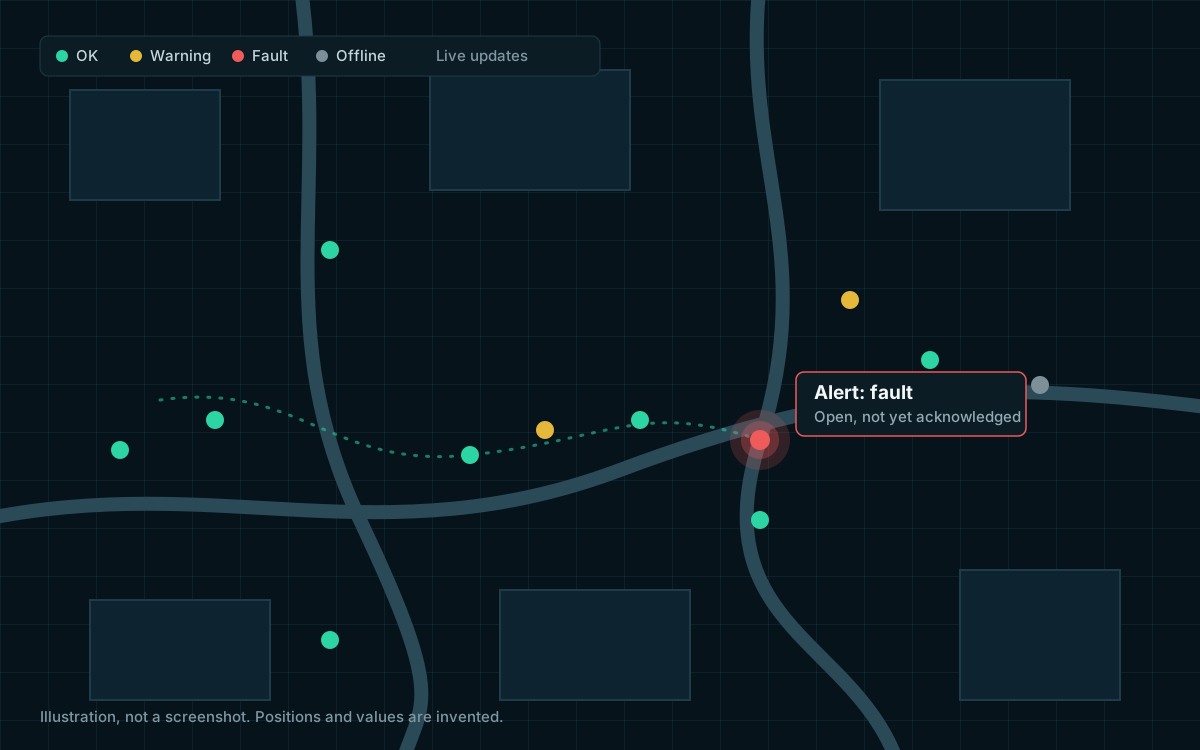
- Live asset states and alerts
- Seven what-if scenario templates
- Recorded run results
- Ingest API with keys
- Sign in with your Sendevo account
- Offline installation
Your assets live in one place. Your plans live in another.
Operations rooms track what is working, what is faulty and what is planned in separate tools. The Digital Twin keeps asset state, alerts and planned work on the same map, so a plan is checked against the assets it touches.
- Runs on your own installation
- No cloud service needed
- Built on Sendevo roads and routing
Live state, not a snapshot
Devices and integrations send states. The map shows the latest status of every asset, and keeps its recent history.
Alerts with an owner
Thresholds and status changes open alerts. Operators acknowledge and resolve them, and who did it and when is recorded.
Plans checked before work starts
A what-if scenario evaluates planned work against your assets and Sendevo routing, and records how it reached its verdict.
One workspace for the map, the alerts and the plans.
The Twin app has a map workspace, a scenarios area and an alerts list. The screenshots show the Germany demo: Berlin open data with simulated states.
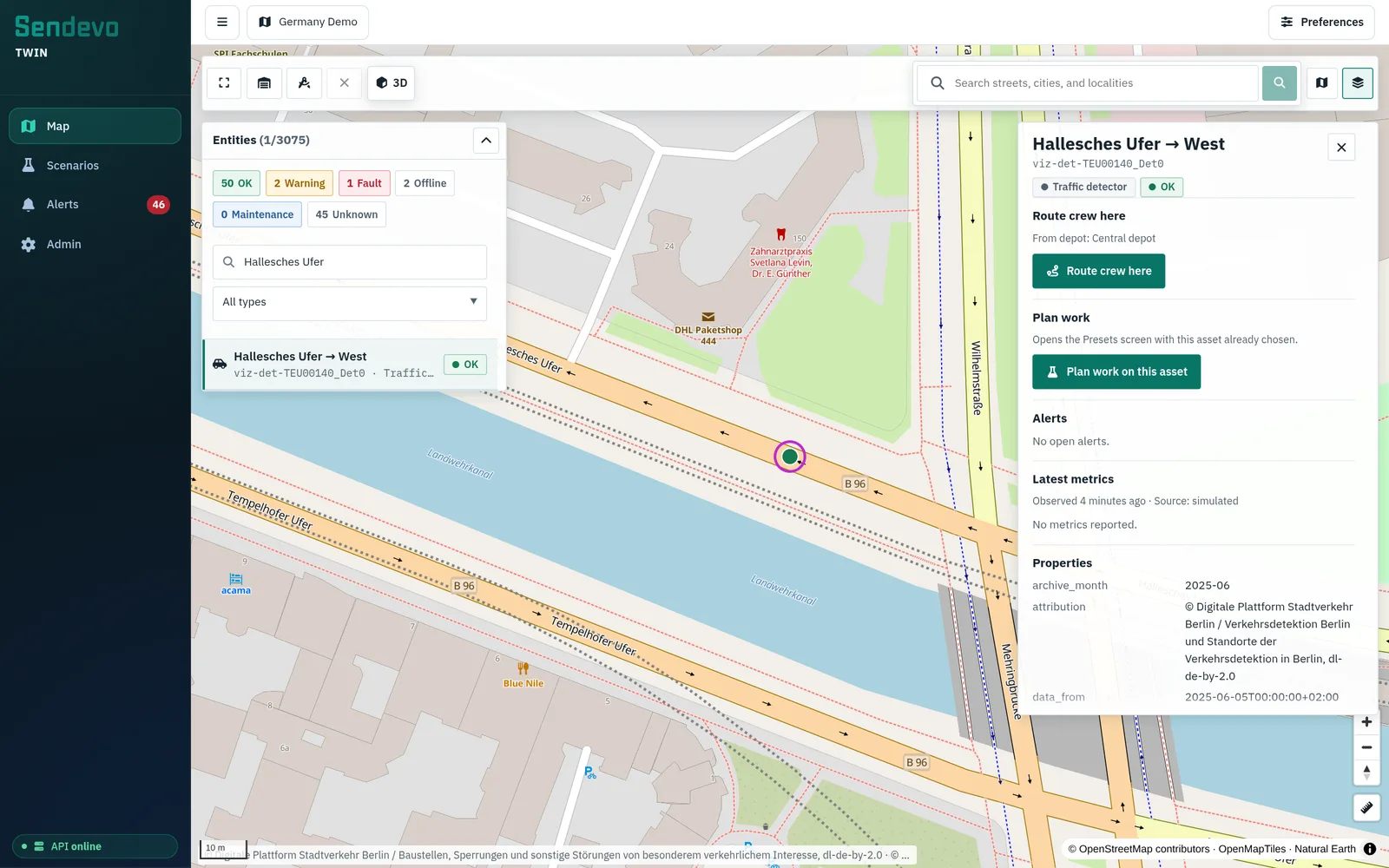
Assets on the map, coloured by status
- Every asset type has its own symbol, and its status colour comes from your catalog
- Click an asset to see its latest metrics, history, source and open alerts
- Layers panel for your asset types and for the Sendevo basemap, with a 3D buildings option
- Route a crew from the configured depot to an asset, using Sendevo routing
What-if scenarios for planned work.
A scenario is planned work on the map: where, when and what kind. Evaluating it checks the work against your assets and, where it applies, Sendevo routing. An evaluation never creates a road closure.
Seven templates
Streetlight work
Replace, repair or inspect a group of lights.
Road maintenance
Resurfacing, markings and lane works.
Road closure
Events and emergencies, with a closure impact preview.
Building works
Construction or evacuation at a building.
Electrical work
Cable, cabinet or substation work. Needs your network data imported.
Drainage work
Pipes and manholes. Needs your network data imported.
Traffic jam
Shows congestion from roadside sensor data.
Closure impact preview
For road work, the Twin asks Sendevo for the effect of a closure on routes, using your sign-in.
Run results you can read
A run records its steps, rules, numbers, affected assets and a timeline.
Advanced scenarios as data
Scenario definitions are written as data with typed inputs and rules, and checked before they run.
Plan work in 3D, below the street.
Switch on the underground view and the ground turns see-through. Buried water mains, sewers and cables appear at their recorded depth, with diameters, the dig and the places where utilities sit too close together. The views below are real scenario runs on Berlin sample data.
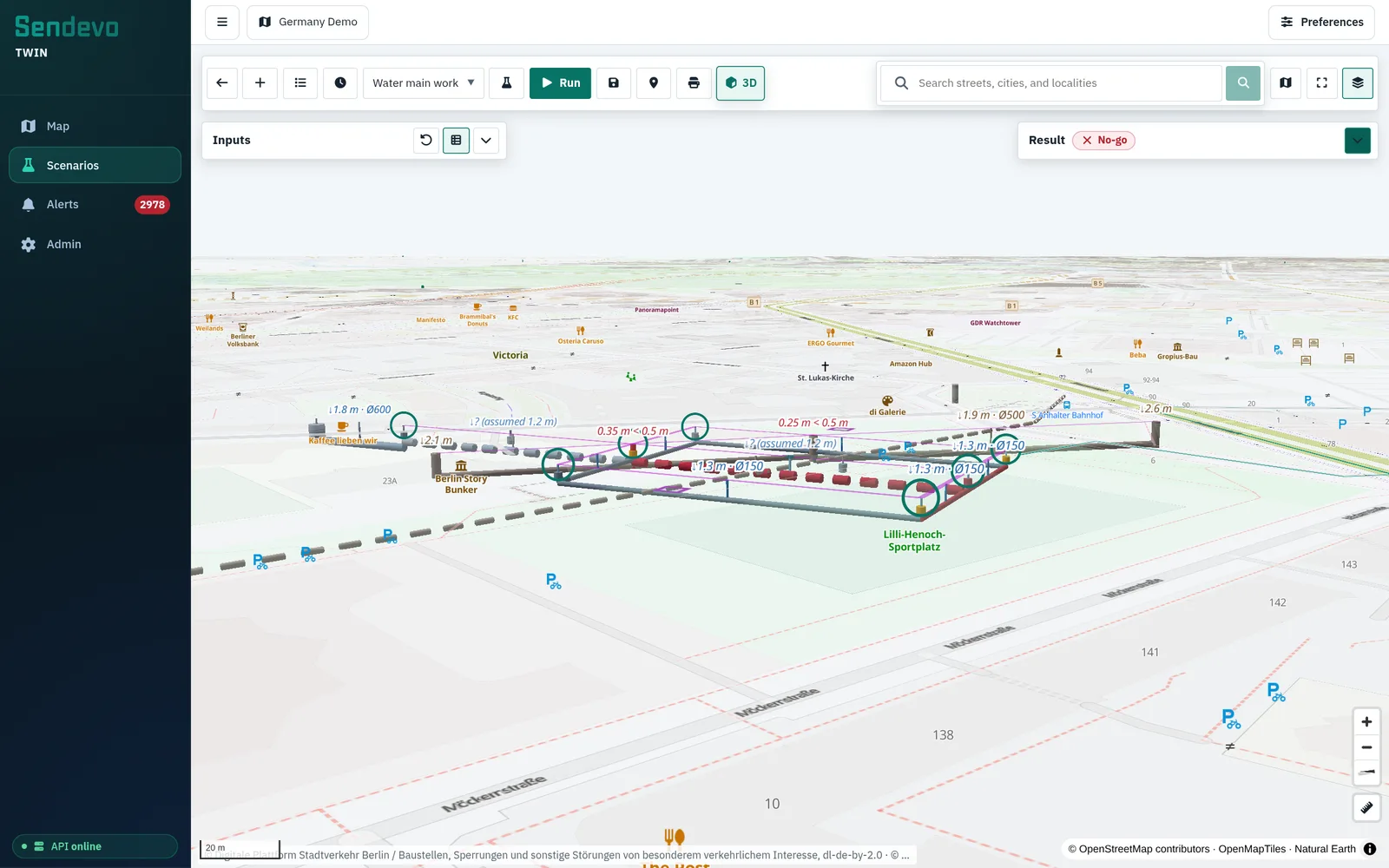
Which valves, customers and hydrants a repair touches
- Mains, valves and hydrants drawn at their recorded depth, with diameters
- The valves to close, the mains shut off and the customers left without water
- Hydrants out of service, and the worst case if one more valve fails
- Crossings that are too close are labelled, for example 0.35 m where 0.5 m is wanted
The result of the same run
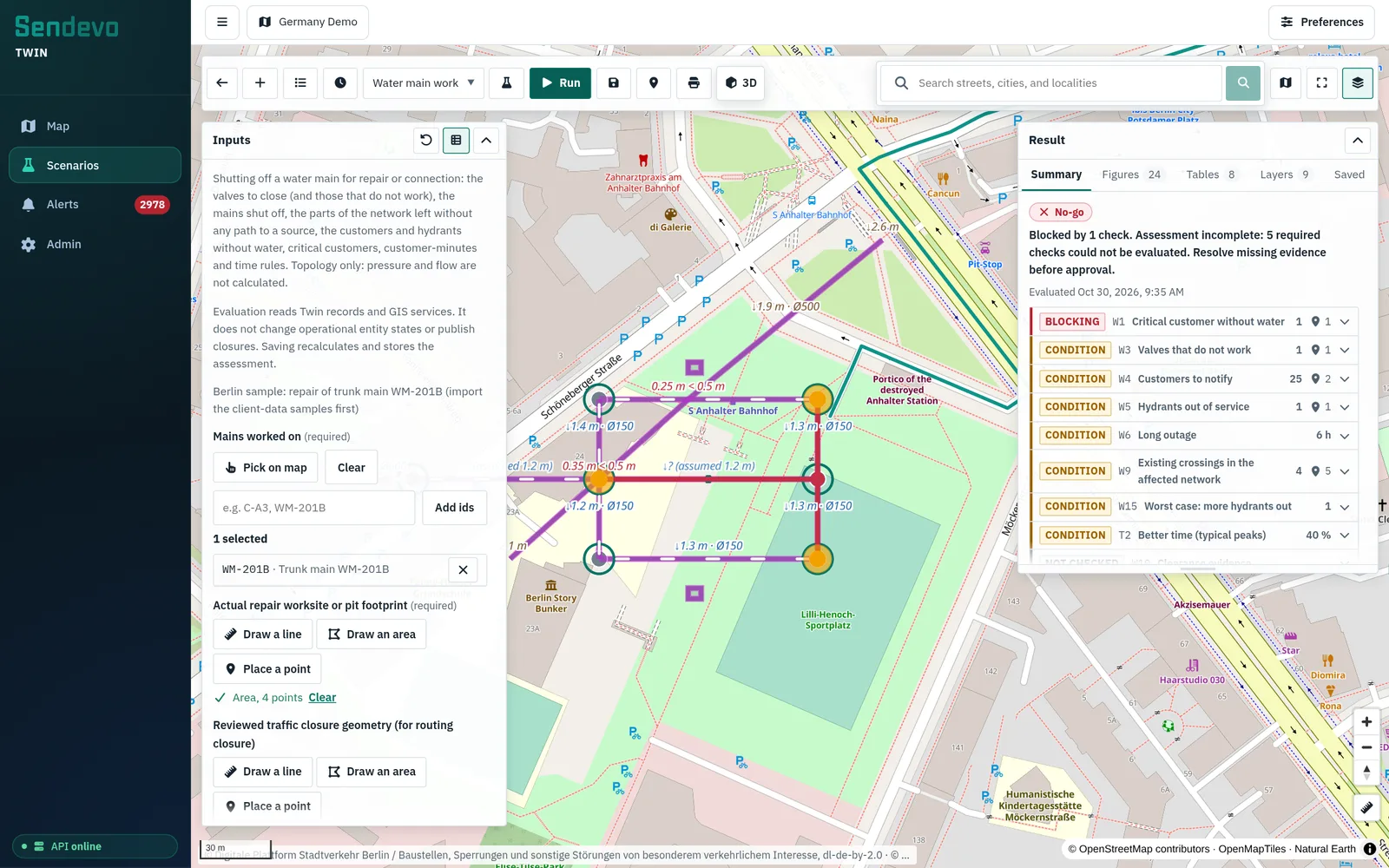
A verdict that shows its evidence.
Each assessment ends in a verdict and records what it was based on. Evaluation is a screening step. It is not an operational authorization, and the Twin has no approval workflow.
Go, go with conditions, no-go
Verdict rules read the recorded numbers. Each rule says why it passed or failed, and what to fix.
Missing evidence is visible
A required rule that could not be checked is listed as not checked, and the assessment cannot be a plain go.
Inputs and outputs recorded
Every step of an assessment keeps its inputs and outputs, so the result can be reviewed later.
Compare two plans
Pin a baseline, change the inputs and evaluate again. The comparison states when numbers cannot be compared.
Export and print
Download results as JSON or CSV, or print a report.
Connect devices and sign in with your Sendevo account.
Devices and integrations send states to the ingest API. People sign in with the Sendevo account they already have, and its role decides what they can do.
Ingest API
POST batches of states, each with a status, metrics, a time and an optional source label.
Ingest keys
An administrator creates keys. They are stored hashed, shown once, and can only send states, not read them.
Roles
Viewers read. Operators also edit assets, import and handle alerts. Administrators also manage keys.
Sendevo account sign-in
Sign in with your GIS console account, including its two-step verification. The Twin keeps no user database of its own.
Import and export
Bring assets in from GeoJSON and export them again. Utility assets can be linked from your Sendevo road-asset data.
Live stream
A server-sent event stream delivers state, alert, asset and scenario events to the app.
Installs offline, on your own infrastructure.
The Twin is packaged for installation without internet access. It needs a Sendevo installation to sign in against and to supply the map.
Kubernetes
A Helm chart for the API and the web entry point.
Native bundle
An offline bundle for Ubuntu 24.04 with systemd, with an installer that takes your Sendevo address.
Docker Compose
The API and a pinned web server in one Compose project, with TLS terminated in front.
Bundled dependencies
The API is a single Go program built from vendored dependencies.
Audit log
Changes are appended to an audit log with who did what, and to which asset.
A demo on Berlin open data.
The Germany demo loads open data for Berlin: traffic detectors and roadworks from VIZ Berlin, and utility objects from OpenStreetMap. The states and alerts you see are simulated, and each state is labelled as such.
Open data only
No client data. Sources and licences are listed with the data, and the map shows the attribution.
Simulated states
The Twin receives states through the same ingest API your devices would use. Here a simulator sends them.
Seven demo scenarios
A built-in run executes seven demo scenarios on the Berlin data and shows pass or fail against what each should return.
Quotation by request.
The licence and installation scope depend on your assets, your Sendevo setup and the scenario work you need.
- Asset types and data intake
- Scenario templates in scope
- Installation target
- Training and support
Questions
Yes. The Twin builds on it for the basemap, roads, routing and your sign-in. It adds its own assets, states, alerts and scenarios.
Yes. It is packaged for offline installation.
No. An evaluation reads your assets and Sendevo routing. It never creates a road closure.
No. A verdict and its eligibility flag are screening signals with their evidence, not an authorization to start work.
Not today. Run the Twin as a single instance and back up its data.
English, German, Arabic (right to left) and Italian.
The assets are Berlin open data. The states and alerts are simulated and labelled as simulated. No client data is used.
Try it on the demo data.
We will walk you through the live map, the alerts and a what-if scenario on Berlin open data, and talk through your own assets.
Demo on open data with simulated states. Quotation by request.