Voice for your fleet, on your own network.
Walkie-talkie channels and 1:1 calls for vehicles, tablets and field teams, running on your own server behind your VPN. No cloud, no public service, no data leaving your site.
- Push-to-talk with floor control
- 1:1 calls by extension or vehicle
- Supervisor override with tone
- Broadcast to a station or all vehicles
- Recording with hold and export
- English, Arabic, German, Italian
- Optional end-to-end encrypted calls
For teams that cannot rely on a hosted voice service.
Depots, plants, ports and field fleets often work on closed or private networks. A cloud push-to-talk service is not an option there, and a consumer messenger gives dispatch no control.
- No cloud or internet dependency
- Runs behind your VPN
- Your server, your recordings
No cloud, by design
Voice, signalling, the console and recordings run on a server you operate. Nothing is routed through a public service.
Closed networks
Tablets and phones reach the server over your VPN or private network, so the system works where public services cannot be used.
Control, not just chat
Dispatch and supervisors see who is talking, step in on a channel, address a whole station and keep a record.
How the whole system works.
Three parts, all under your control: the Sendevo Comms app on the tablets and phones, one server that you run, and a web console for dispatch and supervisors. Pick a flow to see what moves where.
Tablets and phones
Sendevo Comms app
One package, on your network
- Comms API
- Media server
- Database and recordings
- Licence
Web console
Dispatch and supervisors
Animated links show the direction of the active flow. Tablets, phones and the console reach the server over your VPN or private network; no part of the voice path leaves it.
One push-to-talk turn
- 1A driver holds the talk button. The app asks the Comms API for the floor on the channel.
- 2The API grants the floor to one device. Everyone else sees that the channel is busy and who is talking.
- 3The speaker's audio goes to the media server, which sends it to every other member of the channel.
- 4On release the floor is free again. If recording is on for the channel, the transmission is saved and listed in the console.
What operators and drivers get.
Walkie-talkie and 1:1 voice, with the controls a dispatch room needs.
Push-to-talk with floor control
One person holds the floor at a time. Others see that the channel is busy and the name of the speaker.
1:1 calls
Call by extension or by vehicle id. The other device rings and shows who is calling. Calls can be end-to-end encrypted.
Supervisor override
A supervisor takes the floor from a talker. The talker hears a short tone before the floor changes.
Broadcast
One-way talk to all devices of a station, or to all vehicles. It ends after 60 seconds.
Recording
Per channel, encrypted at rest, kept for the retention period. Hold and export flags keep a recording from the purge.
Signed export
Export a recording with a manifest holding its SHA-256 checksum, signed so it can be verified later.
Presence and names
See who is online, talking or in a call. Speaker names show on the floor and on calls.
Four languages, right to left
The console runs in English, Arabic with a full right-to-left layout, German and Italian.
Calls that only the two devices can hear.
End-to-end encrypted calls are a choice you make for your installation. Turn them on when privacy matters more than a record of the call; leave them off when you need recordings.
Your choice, per installation
One setting in the console, off by default. On: every call is encrypted. Off: calls are normal, and a device can still ask for an encrypted call when it needs one.
Keys stay on the devices
Each device makes its own key and keeps it. For every call the two devices agree on new keys with each other; the server only passes the messages along and cannot decrypt the audio.
Compare a safety number
Both screens show a lock and the same 30-digit safety number. Read it out to be sure nobody sits in between. If a device's key changes, the app stops and asks before the call goes on.
Never a quiet downgrade
If a call cannot be encrypted, it does not start and nothing is heard. A call that was meant to be encrypted never falls back to an unencrypted one.
What is and is not encrypted
- Encrypted: 1:1 calls between devices. They are not recorded, and neither the server nor the console can hear them.
- Not end-to-end encrypted: walkie-talkie channels, broadcasts and supervisor overrides. They run through the server, so they can be recorded and reviewed as before.
Calls with a voice user that has no device key (for example from an integration) cannot be encrypted. When encryption is required, such a call is refused.
A web console for dispatch and supervisors.
The server ships with its own console. Watch the fleet, talk and override from the browser, enrol tablets and review recordings, all on your network.
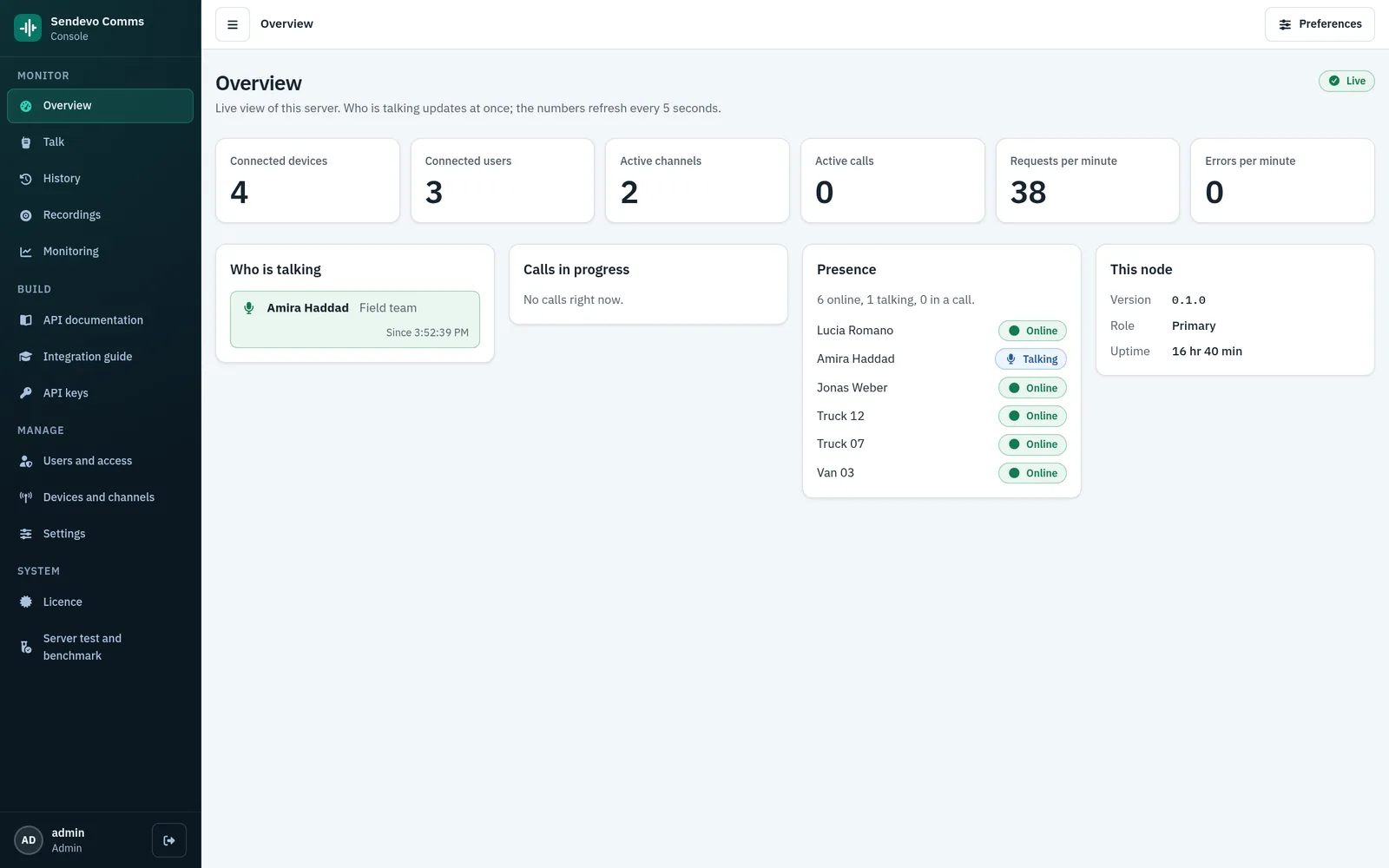
Live view of the server
- Who is talking right now, and on which channel
- Connected devices and users, active channels and calls at a glance
- Presence of voice users and devices, plus node role, version and uptime
The Sendevo Comms app for tablets and phones.
An Android app for vehicles and staff, built on the same API and SDK you can use for your own applications.
- Enrol the device once with a one-time code from the console
- Driver sign-in per shift
- Channel list and a large push-to-talk button
- Optional end-to-end encrypted calls, with a lock and a safety number to compare
- Call and incoming-call screens, with speaker names
- Android 12 and later; English, Arabic, German and Italian
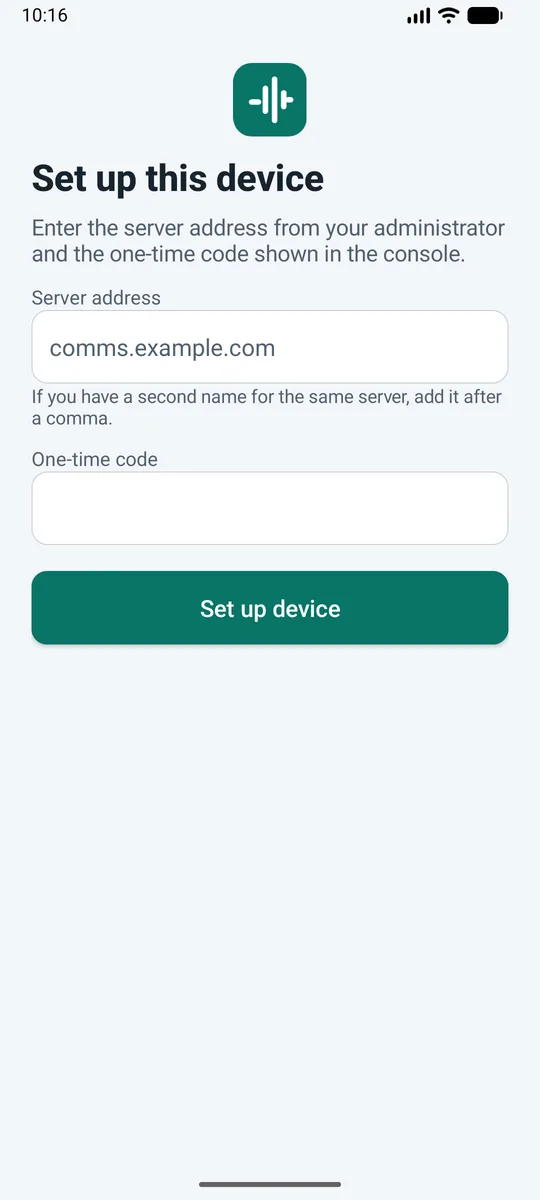
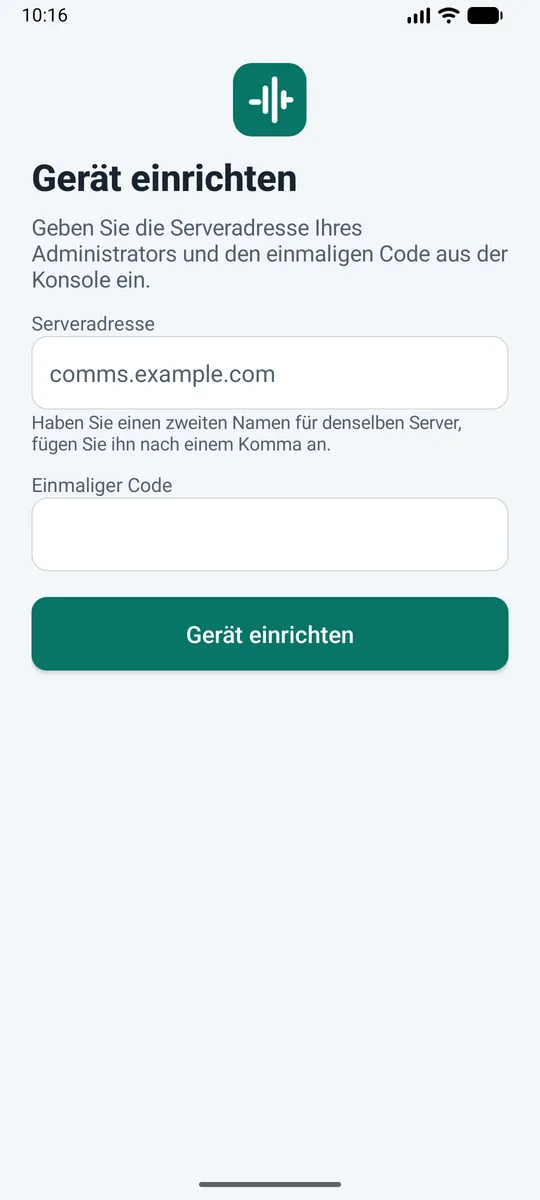
Set up the device
Screenshots are from the Android emulator, not a physical device.
An Android SDK and an iOS SDK for your own apps.
Put push-to-talk and 1:1 calls into your own Android and iOS applications. Both SDKs wrap the Comms REST API and the voice connection.
- Connect to your server and join a channel
- Push-to-talk and 1:1 calls
- Encrypted 1:1 calls with a safety number
- Events and presence
- Automatic reconnect, and failover between two server names
- Audio falls back from UDP to TCP and then to the HTTPS port, for VPNs and strict firewalls
- An Android sample and check app that runs the SDK against your server and prints a pass or fail report
Your server also serves an OpenAPI description and integration guides in its console.
Deployed as one package on your own server.
A single Docker Compose package with an installer, a reverse proxy and monitoring. You operate it inside your network.
One package
API, media server, database, console, proxy and monitoring ship together and install with one installer.
Runs offline
No internet connection is needed to run it. Update, backup and restore scripts are part of the package.
Behind your VPN
Clients reach one HTTPS entry point on your server over your VPN or private network.
High-availability pair
Optional active and standby servers. The standby streams the database and copies recordings. An operator promotes it after the old primary is fenced; there is no automatic failover. Clients then use the second server name.
Licence
A licence file bound to your node. Live voice is never blocked by licence state.
Security that stays inside your network.
Access, keys and recordings are controlled on your server.
Roles and sessions
Console users have roles. Sessions use an HttpOnly cookie, changes need a console header, and repeated wrong passwords are throttled.
API keys with scopes
Integrations use keys limited to the scopes they need. The secret is shown once and stored hashed.
Devices act as themselves
A tablet enrols with a one-time code, can act only as itself and can be revoked at once.
Encrypted recordings and audit log
Recordings are encrypted at rest. Sign-ins, admin changes, playback and export are written to an audit log whose rows are chained, so an edited row is detected.
Protected monitoring
Grafana and Prometheus sit behind the console login, and server metrics are not exposed through the proxy.
End-to-end encrypted calls
Optional, set per installation. Keys are made on the devices and stay there; the server relays the key exchange but cannot decrypt a call.
One-time licence, priced for your deployment.
Quotation by request. Each high-availability cluster uses one seat, and there is no cap on the number of users. The quotation depends on:
- Deployment topology
- High-availability pair
- Integrations with your systems
- Installation and support scope
Frequently asked questions
No. Voice, signalling, the console and recordings run on your server. Tablets and phones connect over your VPN or private network.
The app is for Android 12 and later, on tablets and phones. Dispatch and supervisors use the web console in a browser.
Push-to-talk transmissions are recorded on channels that have recording on, and so are broadcasts that reach such a channel. 1:1 calls are not recorded. Recordings are kept for the retention period you set.
Yes, if you want it. One setting in the console makes every call end-to-end encrypted: the keys stay on the devices, the server cannot hear the call, and it is not recorded. The setting is off by default, because many sites want recordings. Walkie-talkie channels, broadcasts and overrides are not end-to-end encrypted.
With a high-availability pair, an operator promotes the standby after fencing the old primary, and clients use the second server name. Failover is a manual step, not automatic.
No. The licence has no user cap; each high-availability cluster uses one seat.
Yes. There is a REST API with scoped API keys, an events stream, an OpenAPI description, an Android SDK and an iOS SDK.
The console runs in English, Arabic with a full right-to-left layout, German and Italian.
Bring voice for your fleet inside your network.
Tell us about your sites, your vehicles and how your network is set up. Sendevo will help define the right Comms package for your environment.
Include the number of vehicles and sites and whether you need a high-availability pair, so we can prepare a relevant discussion.